A browser, be it Chrome, Safari, Edge, Firefox or Brave is an application that has become central to using a computer. It's our portal to our bank account, a view into our email and a way to see our calendar at a glance. These days, there's a web page for everything and anything. With so many things wanting you to click a link to get to a web page, it can be difficult to tell if a link is safe or if clicking it will result in your entire company and all of its documents being held up by Ransomware.
Here's a few tips to help you determine if that link is safe to click.
When in doubt DO NOT CLICK THE LINK.
This is the easiest one to follow. If you don't click, there's a very good chance that you do not get compromised. Most data breaches today are the result of someone clicking on something that they should not have clicked on.
Notepad is your friend.
Seriously, Notepad is a default windows application. Everyone on Windows has it and nothing will execute from pasting the contents into notepad. Right click a link in an email and select "Copy Link". Past the link into Notepad to safely inspect the contents of the link before proceed.
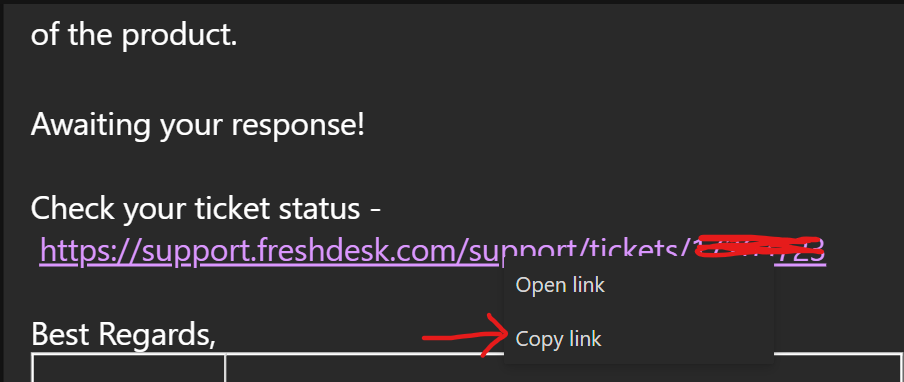
In the email above, the link is "https://support.freshdesk.com/support/tickets/*******" which corresponds to the displayed value in the email. You at least know that the link and its displayed value are the same. This doesn't mean that it is safe. It just means that the email isn't hiding something.
Check for malformed domain names.
A domain name is typically some name or phrase followed by a dot and then followed by a top level domain suffix. (.com, .net, .org, .io) There are hundreds of top level domain suffixes. For a list of them, you can visit the ICANN website. data.iana.org/TLD/tlds-alpha-by-domain.txt
The URL that you are going to in your browser consists of a protocol and a domain name.
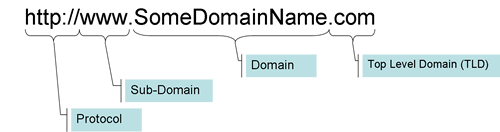

The link you pasted into Notepad should follow this convention. However, there are a number of ways to deceptively present domain names. Here are a few examples.
Typo Squatting - In this case, a malicious website registers a valid domain name that is a spelling typo off of the domain name that they wish to impersonate. The target will receive an email with a link to "go0gle.com" where one of the o's has been replaced with a numeric zero. Domain names with L, I and S are particularly susceptible to this type of impersonation. Lowercase L is easy to replace with a lowercase I and as you can see here l is indistinguishable from l. (uppercase I (eye) vs lowercase L (ell))
Concept Squatting - In this case an example would be bmwcars.com. The real web address for the automotive manufacturer is bmw.com. The attacker is betting that you will believe that their bmwcars.com link is legit because it is reasonably close in context. Don't fall for it.
Lookalike URLs - Another form of typo squatting that depends on most of the world reading from left to right. Domain names are VALIDATED right to left starting with the top level domain, then proceeding to the domain and finally a subdomain if it is there. Lookalike domains will present themselves as real domains expecting the user to stop reading after they parse the domain from left to right. "www.google.com.mydomain.com" is a MYDOMAIN.COM domain and NOT a google.com domain. However, unsuspecting users will read www.google.com and think everything is on the up and up when it is far from that. You won't see the domains in any legitimate link from any reputable source. You can always be skeptical of these links.
Open a browser tab and go to the top level domain.
Suppose you paste the following link into notepad and you think it is safe. "https://www.elysianonline.com/shopify-b2b". how can you get more information about this link? In Notepad, copy and paste the link to a new line and strip off the subdirectory that is after the domain name. Remembering our anatomy above, the domain name will end in a top level domain suffix. In this case it is ".com". Everything after that address is a specific page or resource on that domain. In most legitimate URLs, you can navigate to the site without the subdirectory and get what is called a "Home Page". For the example here, stripping off the "/shopify-b2b" in the URL and pasting the remaining URL into a new browser window takes you to our home page.
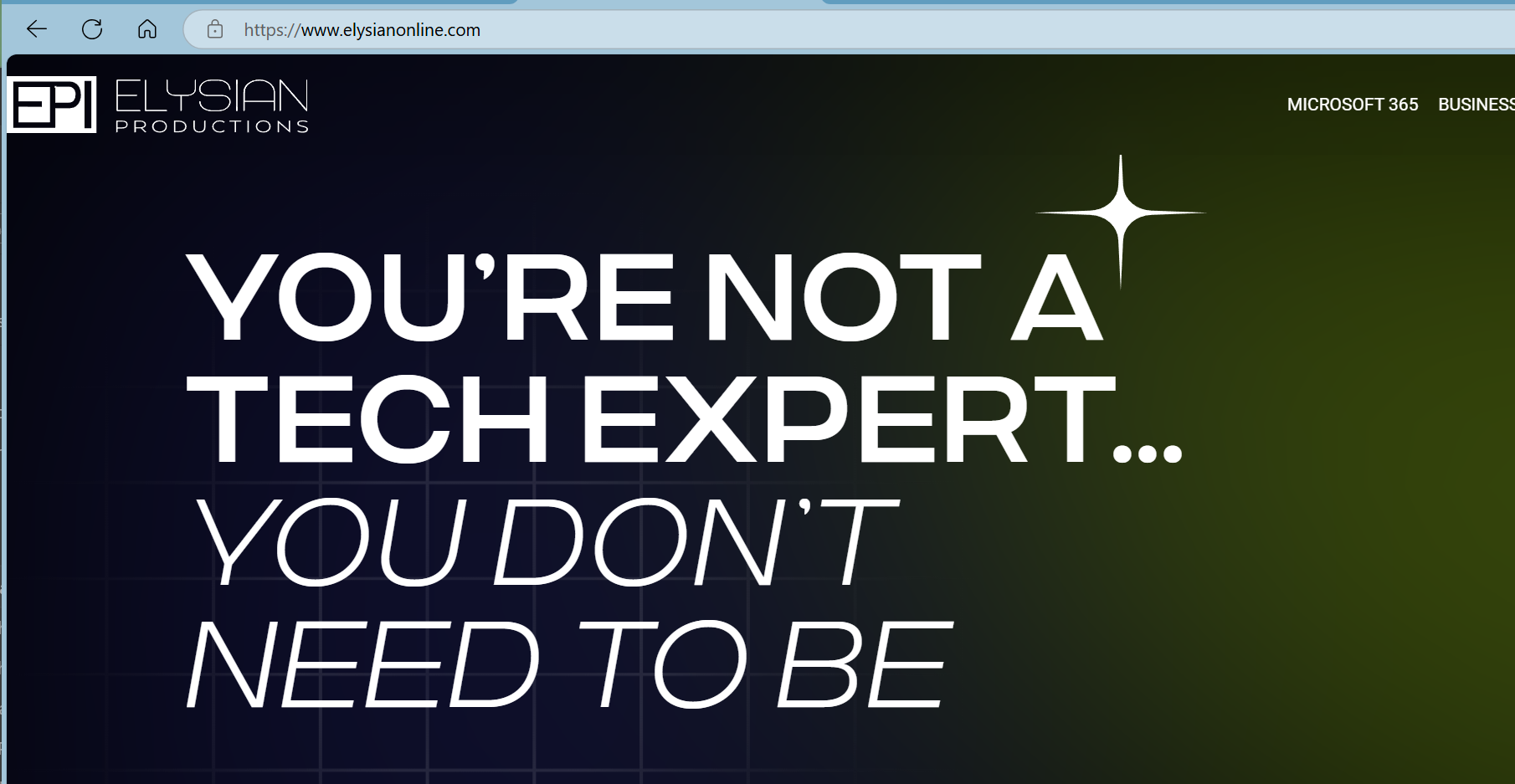
That resolving to a web site is a single data point vote of confidence that the URL you are being sent to in the email is safe. That's not enough though. The protocol portion of the URL should always be https. See the first hint whenever you are presented with a URL to click that is "http" and not "https". HTTP is plain text without encryption. Everything you type on that page is visible to the entire Internet and every server/device that your request passes through on the way to its destination. DO NOT CLICK HTTP LINKS.
We're still not confident. Let's take a look at the SSL certificate. SSL certificates are bought by a company to assert that the communication with the web site is from the owner of the domain. In order to obtain an SSL certificate, the company that owns the domain has to prove that they own the domain. In some cases, the company must provide articles of incorporation and other official documents. In your browser, click on the lock or information symbol next to the URL.
EDGE

CHROME

The first thing you will see if the site is safe is that the connection is secure. Both Chrome and Edge show this information in a similar manner.
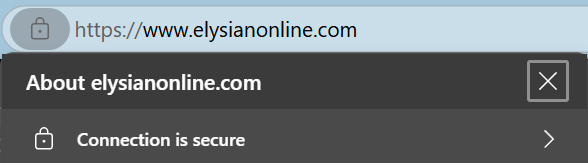
Click the Arrow on the right to view the details of the certificate. The example below is done with Edge. Chrome has an analogous way to get at the certificate details.
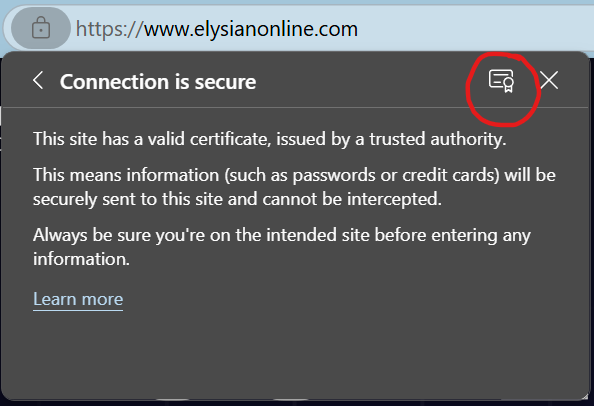
For our website, you can see the following details.
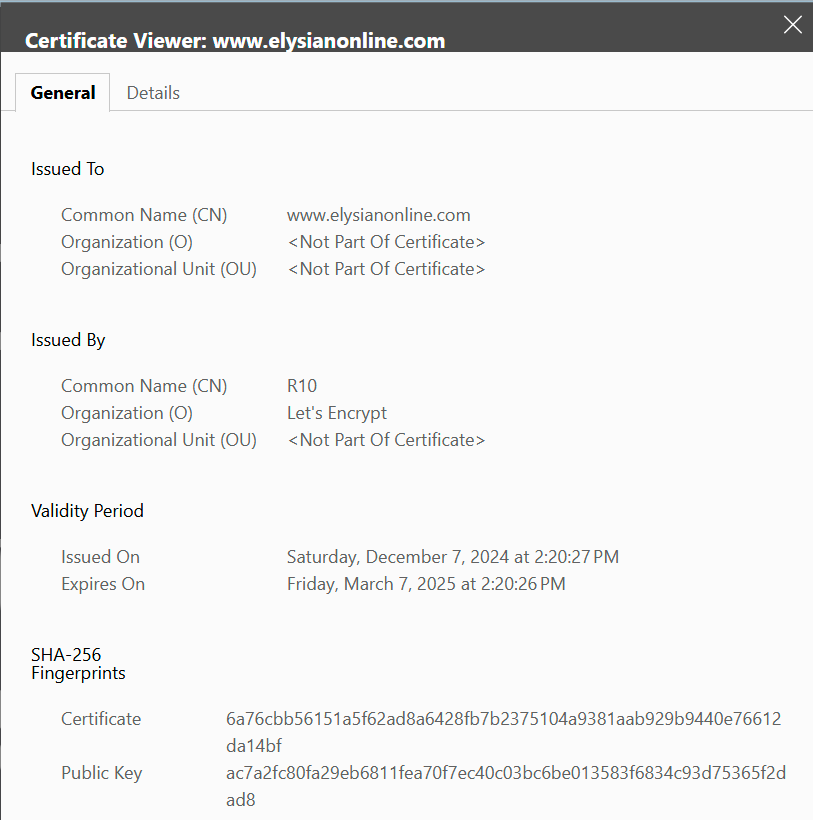
Since we do not transact in any data on our website beyond that which is publicly available, we present a certificate with a strong encryption strength but we do not assert anything else other than the domain name. I'd expect more in the certificate details for a site where I was going to verify and account or provide personally identifying information.
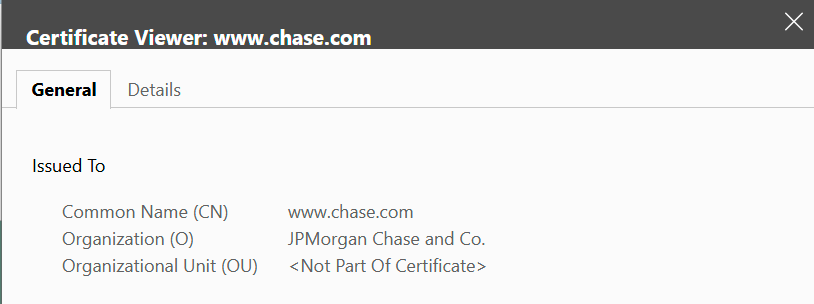
JP Morgan Chase (chase.com) provides the user with a bit more details. You can copy the Organization name into a Bing.com or Google.com search and it should return results to that company. In this manner, you can avoid concept squatting domain names and visually confirm the domain name that is in Notepad.
As a final means of validating a domain name that you are not sure of, look on third party web sites such as Facebook, Twitter, Yelp and other business lookup pages. If you know where the business is incorporated, you can look for details on the Secretary of State's web site.
If after all of this, you are still unsure, send us a support ticket at support@elysianonline.com. We can look at the link you are trying to go to and will be able to give you advice on its safety. If all this doesn't make you feel safe about clicking the link, listen to your gut. It's often right when it is afraid to click. Don't click. Pick up the phone and call the organization to see if they sent you the email that has a link in it to click. Find the organization's phone number from a third-party web site and don't just use the phone number / contact information at the bottom of the fraudulent email. The point of the email is to get you to click. They will not admit that they are trying to defraud you so you cannot trust any of the contact information that is in the email itself.
Hopefully this helps you identify potentially unsafe links.
Was this article helpful?
That’s Great!
Thank you for your feedback
Sorry! We couldn't be helpful
Thank you for your feedback
Feedback sent
We appreciate your effort and will try to fix the article